Cameras + NVR
Existing RTSP cameras and supported Hikvision NVR channels connect inside each site.
RTSP ingestion
VIDEO INFRASTRUCTURE / VIGILSYN
From the cameras on your network to the people who need to see them. A self-hosted platform for live video, recording and camera control.
Your hardware. Your infrastructure. Your view.
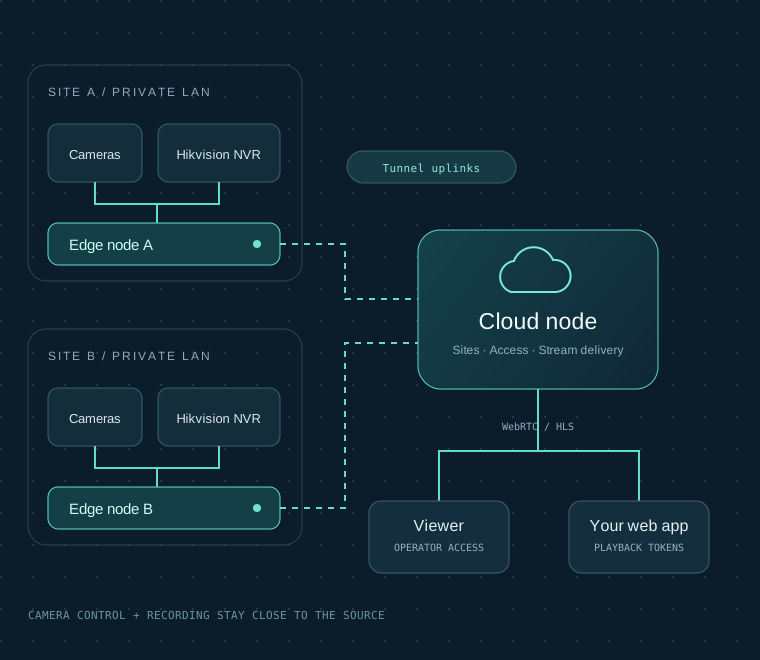
Reference architecture · deployment illustration
RTSP cameras / Hikvision NVRs / WebRTC & HLS / Tunnel
THE SIGNAL PATH
Keep camera traffic and control close to the source. Bring the views you choose into a shared Cloud, then into the applications your team uses.
Existing RTSP cameras and supported Hikvision NVR channels connect inside each site.
RTSP ingestionLocal recording, camera discovery and PTZ control. Publish selected cameras to Cloud.
Tunnel uplink →Organize sites and cameras, authorize access and serve live streams to your viewers.
WebRTC / HLS delivery →Use the operator Viewer or integrate video with backend-issued, short-lived playback tokens.
Scoped playback accessCamera control and recording API requests can stay local to Edge. Viewer and application access use reachable Cloud endpoints; they do not require their own tunnel.
01 / THE PLATFORM
Cameras belong on your network. The right view should be available wherever your work takes you.
THE EDGE NODE
Connect RTSP cameras or import channels from a Hikvision NVR. Keep recording, presets and camera control close to the source, with a local operator interface.
MADE FOR THE WORK BETWEEN INCIDENTS
The everyday work matters: knowing which camera you’re looking at, finding a recording, and giving the right person the right access.
Talk through your workflowOrganize cameras by site, region and group. Move from an overview to the camera you need, with WebRTC and HLS playback options.
Browse camera recordings by time. Use named clips and configurable pre-roll and post-roll when your workflow needs a specific moment.
Use supported camera or Hikvision NVR PTZ endpoints. List and use presets from an operator interface or your own application.
Give applications scoped credentials and short-lived playback tokens. Manage Cloud and Edge capacity with online or offline licenses.
02 / YOUR INFRASTRUCTURE
Start with your network, hardware and operating needs. Deploy the pieces you need, on servers you control.
Keep cameras, recording and local control on the site LAN. Deploy the Edge node beside your existing camera network.
Local operations / Existing hardwareConnect Edge nodes to Cloud through a tunnel. Organize camera access and deliver streams without exposing every camera individually.
Multi-site / Central visibilityMake live video part of an existing web application. Your backend handles authorization; your users stay in your experience.
Developer API / Signed playbackDocker deployment on Ubuntu. Offline image packages for restricted environments. Browser playback depends on reachable endpoints, supported codecs and trusted HTTPS where required.
DEPLOYMENT & CAPACITY
Start with your camera bitrate, recording retention and viewing patterns. Leave room for the moments when demand rises.
Pilot baselines, not channel capacity guarantees. Validate with your actual cameras before production.
| Role | Pilot baseline | Plan for |
|---|---|---|
| Edge | 4+ CPU cores 4+ GB RAM | Camera LAN, recording disks and selected stream publishing. |
| Cloud | 2+ vCPU 2+ GB RAM | Reachable IP, viewer egress and optional clip storage. |
| Viewer | Separate web node | Reachable Cloud API and media endpoints; playback decoding runs in the browser. |
Ubuntu Server 22.04 / 24.04 · Linux x86-64 or ARM64 · Docker Engine + Compose. Transcoding requires separate CPU/GPU sizing. Network, disk throughput and browser decoding can limit capacity before server memory does.
Check the exact NVR model and firmware in a pilot. H.264 is the practical starting point for browser playback; other codecs depend on the browser and playback path.
INTERACTIVE PLANNING TOOL
Estimate a constant-bitrate workload. Change the values to match the streams you actually publish and record.
Ingress assumes one published profile per camera and one Cloud destination. Egress counts individual camera plays: four viewers watching four cameras = 16 plays. Additional profiles, Cloud destinations, clip replication, audio and protocol overhead increase usage. Storage uses decimal TB, constant bitrate and the chosen recording hours; headroom is a planning allowance, not a measured overhead. Event recording and variable bitrate change actual results.
Ingress Mbps = cameras × bitrate. Viewer egress Mbps = concurrent stream plays × bitrate. Storage TB = cameras × bitrate × 1,000,000 ÷ 8 × hours/day × 3,600 × days ÷ 1,000,000,000,000. Planning allowance = estimate × (1 + headroom ÷ 100).
03 / FOR DEVELOPERS
List the available cameras, map stable camera IDs to your interface, and issue scoped playback tokens from your backend. Keep the API key out of the browser.
Read the integration overviewcurl --fail-with-body \
-H "Authorization: Bearer $VIGILSYN_API_KEY" \
"https://console.example.com/api/v1/cameras"Use the returned ID to connect the right camera to the right part of your application.
Illustrative request. Use your own Cloud address and a scoped server-side key.
04 / OUR STORY
Good infrastructure starts with understanding the work on the other side of the screen.
Our experience in camera systems began around 2020. Vigilsyn brings that background to a platform built around the practical realities of live video: local networks, distributed sites, recording workflows and applications that need a dependable view.
We believe the infrastructure should be yours to operate. The product should help your team see clearly.
LET’S PLAN THE NEXT VIEW
One site or several. Existing cameras or a new installation. Let’s start with what you need to see.
[email protected]A useful starting point: number of sites and cameras, NVR models, recording needs, and where viewers will connect.